
Payment Gateway Sign Up (Pin Payments)
BowlsLink utilises the services of a payment gateway to facilitate secure online payments by members to clubs, associations, state bodies and Bowls Australia for services such as membership, registration for courses and paying for entry into competitions.
To use the payment service provided within BowlsLink an authorised representative of the club or association must complete the Payment Gateway sign up process integrated with our payment provider Pin Payments.
This document will provide further information, steps and guidelines around this process.
Note: Any clubs or associations who attempt to enter a fee (except for $0) in BowlsLink without being registered will be blocked and redirected to the Payment Gateway sign up page.
- Payment Gateway Benefits
- Sign Up Process
- Register in BowlsLink
- Email your KYC required documents
- Complete identity check
- Fee and charges
- Your Pin Payments account
- Security and Privacy
- PCI Compliance
- Security Audits
- Sensitive Information Storage
- SSL
- Privacy
- Terms and Conditions of Use
- Refunding through Pin Payments
- Creating a refund
- Adding funds to your balance
- Step-by-step guide
Payment Gateway Benefits
The new Payment Gateway now provides the following benefits to clubs who wish to use BowlsLink services to take payments for Membership, Competitions or Events.
- Clubs or association can receive payments to their nominated bank account within days or at a desired time frame i.e. weekly or monthly
- BowlsLink transactions incur a relatively low 1.5% fee plus 12 cents per transaction incorporated into payments. i.e. for a $100 payment a club or association would receive $100 less the payment gateway fee of $1.50 + 12 cents = $98.38. This is the full Payment Gateway fee with no additional surcharge provided to Bowls Australia or the BowlsLink service provider. More details under Fees and charges.
- The club or association will have a dedicated Pin Payments account which they can manage independently to add or remove additional account managers and/or view payments, fees etc..
Note: BowlsLink will still provide a ledger of payments and invoices with available reports. - The payment gateway provider Pin Payments is an Australian based company which provides an extra level of support and system maintenance aligned to our time zone as opposed to any international providers.
Sign Up Process
The Sign Up process is required to comply with the respective Know Your Customer (KYC) and Anti-Money Laundering (AML) regulations within Australia.
BowlsLink now uses Pin Payments as our Payment Gateway provider.
Pin Payments uses HooYu as the designated ID verification platform.
The Sign Up process is completed in a three (3) step process which should take around 10-15 minutes to complete provided you have the required documents available (read below) and within 48 hours to be verified.
- Register via BowlsLink for a Pin Payments Account
- Email Pin Payments support your club or associations KYC required documents
- The authorised account holder must complete an identity check along with one other authorised person.
Register in BowlsLink
Begin the Payment Gateway registration process via Integrations within BowlsLink, select ENABLE.

Complete the required fields noting several may be prefilled for you to assist with the sign up process, then SUBMIT.
Email your KYC required documents
Once the initial registrations questions have been completed you be provided further information on the next screen to proceed.

This includes sending an email to Pin Payments support support@pinpayments.com with the subject heading MemberPoint – (Your Club/Association Merchant ID) this will prefill for you if you click the email link within BowlsLink. You will need to attach the required Know Your Customer (KYC) documents which are as follows
- A copy of your club or association Constitution.
- A copy of the last board or executive committee minutes (noting this must include your authorised representative as an attendee).
- A copy of the bank statement for the nominated bank account.
- The identity of one other authorised person.
Please note you may redact any sensitive information in documents 2 and 3.
Complete identity check
Your club or associations authorised representatives will be required to sign in to complete an identity check. Alternatively you can register for an identity check via this link – Pin Payments HooYu identity request
Note – This step is is best completed using your mobile phone as it makes the process simpler.
The process includes three verification steps;
1. Selfie taken with your smart phone
2. Upload photo of Photo ID (Passport or drivers licence)
3. Upload photo of Proof of address (Rates notice, bank statement, gas/power/electricity utility statement)
Once these three processes are completed your Pin Payments account should be verified within 48 hours. Should your required further assistance during this process please contact bowlslink@bowls.com.au
—
If your club or association is an Australian Public Company you will be required to complete some additional documents and verification.
- A supplier invoice addressed to your club or association
- An invoice addressed to a customer
- ID verification for one additional director of the club or association
Fee and charges
The BowlsLink transaction fee is 1.5% of the total payment and 12 cents per transaction.
Customers can pay by an Australian Visa or Mastercard, both credit and debit cards are accepted.
BowlsLink does not currently accept International Visa and Mastercard or Amex.
Should a payment dispute occur and it is ruled in the customers favour a $25 Dispute administration fee will apply.
Your Pin Payments account
Clubs and associations should manage their own Pin Payments account, please ensure you do not share login credentials or record them in any method in which they can be accessed by others.
For extra security we also suggest that you enable Two Factor Authentication on your Pin Payments account.
Pin Payments provide a range of support articles to assist you.
Some common FAQs are
How do I change the email address on my account?
Where do I update my bank account details?
Why did a charge (transaction) fail?
Using Two Factor Authentication
Pin Payments includes a Xero bank integration, if your club or association uses Xero can you turn this feature on – Xero Bank Feed Guide
Further Pin Payments support (email and phone) is available at https://pinpayments.com/support/contact
Security and Privacy
BowlsLink does not record or store customers credit card information.
All documents provided during the sign up process are via our Payment Gateway provider Pin Payments.
Pin Payments takes several steps to prevent unauthorised disclosure or modification of sensitive information.
PCI Compliance
As a Level 1 Service Provider, Pin Payments software, systems and procedures have been assessed and certified to the highest level of compliance provided by the Payment Card Industry (PCI) Data Security Standards.
Security Audits
Pin Payments’ Product and website are subject to periodic manual and automated security audits. Audits are conducted internally as well as by third parties.
Sensitive Information Storage
Credit card information is encrypted and stored in a system completely isolated from Pin Payments. At no time is unencrypted card data stored on disk either inside Pin Payments’ system or in the card storage system. Internally card information is referenced only through the use of a token. The token is not derived from card information in any way.
SSL
All requests to the Pin Payments website and API are forced to use HTTPS to ensure encrypted communications.
Privacy
Privacy Policies relating to the sign up process and use of BowlsLink
Bowls Australia Privacy Policy
Terms and Conditions of Use
Further Terms and Conditions regarding the use of Bowls Australia Online Systems
Bowls Australia Conditions of Use Online Systems
Refunding through Pin Payments
When you refund a charge, funds are returned to the card originally used by your customer. Typically a refund will succeed and appear as a credit on your customer’s statement.
If the card has expired or was cancelled, the customer’s bank will decline the refund and we mark the refund as failed. You’ll need to organise an alternative method to refund your customer in these situations.
Creating a refund
Find the charge you wish to refund in your dashboard, and click to view its details.
On this screen, click the ‘Refund Options’ dropdown.
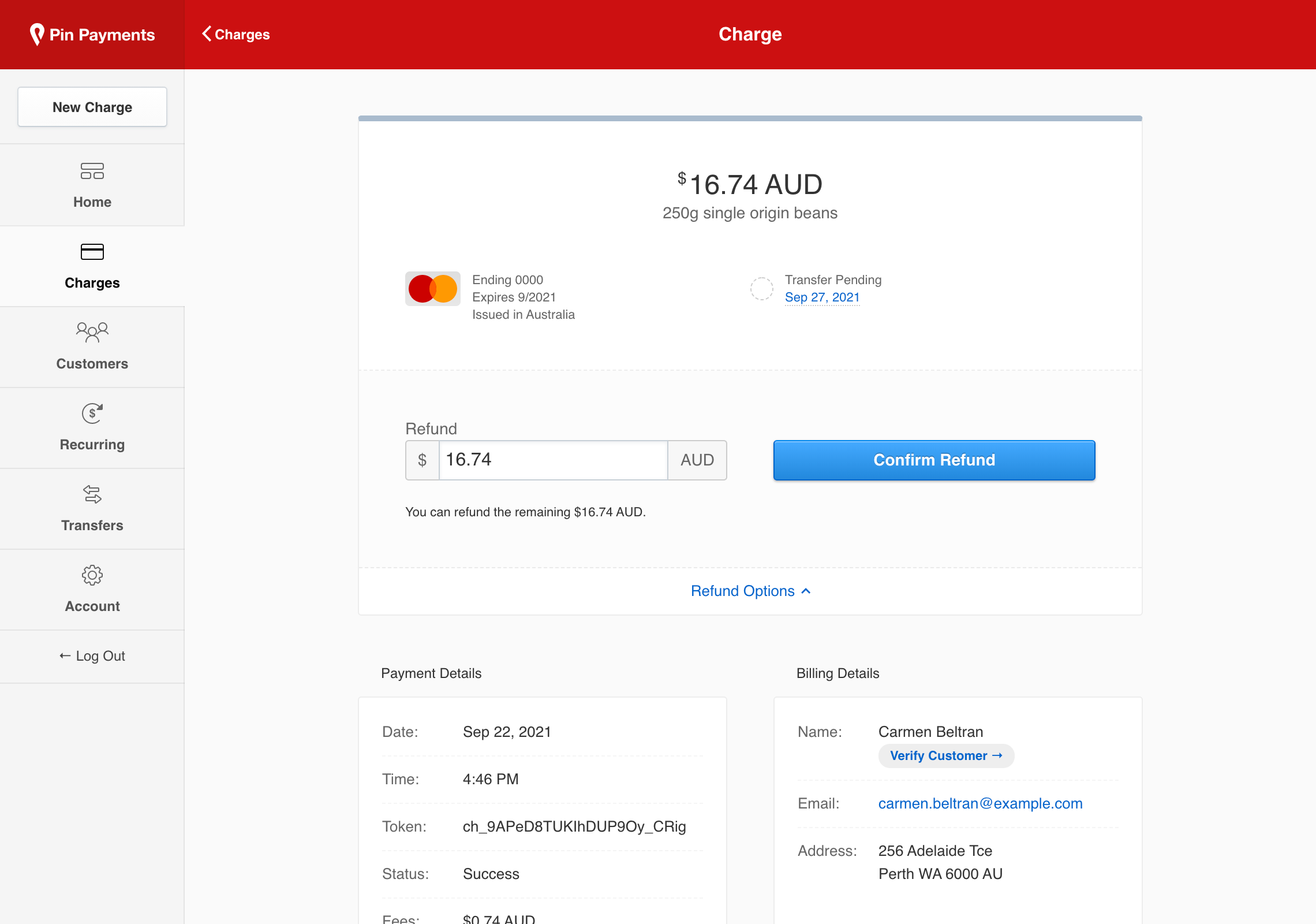
To proceed with a full refund, click ‘Confirm Refund’.
Refunds are displayed on the Charge details screen. If a refund cannot be processed (such as when a card has expired), the status is marked as ‘Failed’.
Adding funds to your balance
When your account balance is insufficient to process a refund, you can add funds to your balance with Deposits (available from Account → Deposits).
On the Deposits screen you’ll see the Pin Payments deposits account, along with your unique deposit Narration.
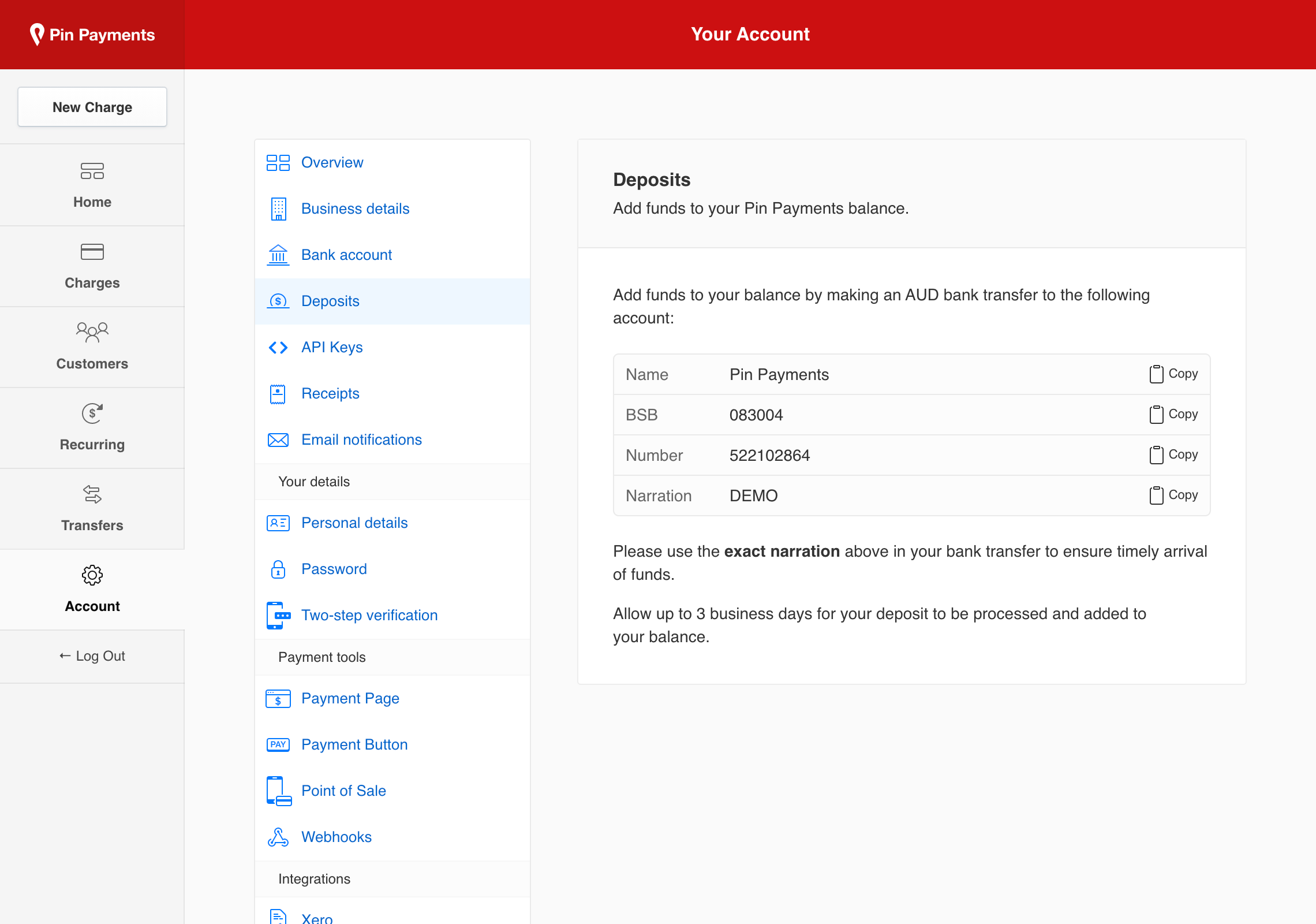
When you transfer funds, ensure you use your Narration (Name, BSB, Number and Narration). This allows us to identify your deposit and credit your account. Please allow up to 3 business days for your deposit to be processed.
Once processed, Pin Payment credit your account and set your transfer schedule to manual. This pauses transfers to you, so you can perform refunds without automatic transfers depleting your account balance.